12
files in one zip
For independent cafes, tea houses and boba shops
In the kit's sample shop, week three's labor ran 32.2 percent against a 28 percent target: $479 over in one week. Tillwhistle shows it on Monday morning, in time to fix the next schedule. It is twelve files you keep, in Excel that opens in Google Sheets, plus PDFs and Word files.
$97 once, with a 14-day fix-it-or-refund guarantee. The free sheet needs no email address.

12
files in one zip
48
page manual
2,382
formulas, checked for errors
14
day fix-it-or-refund guarantee
Made by someone who helps run the day-to-day at an independent tea house. Questions go to support@tillwhistle.com, and a real person answers.
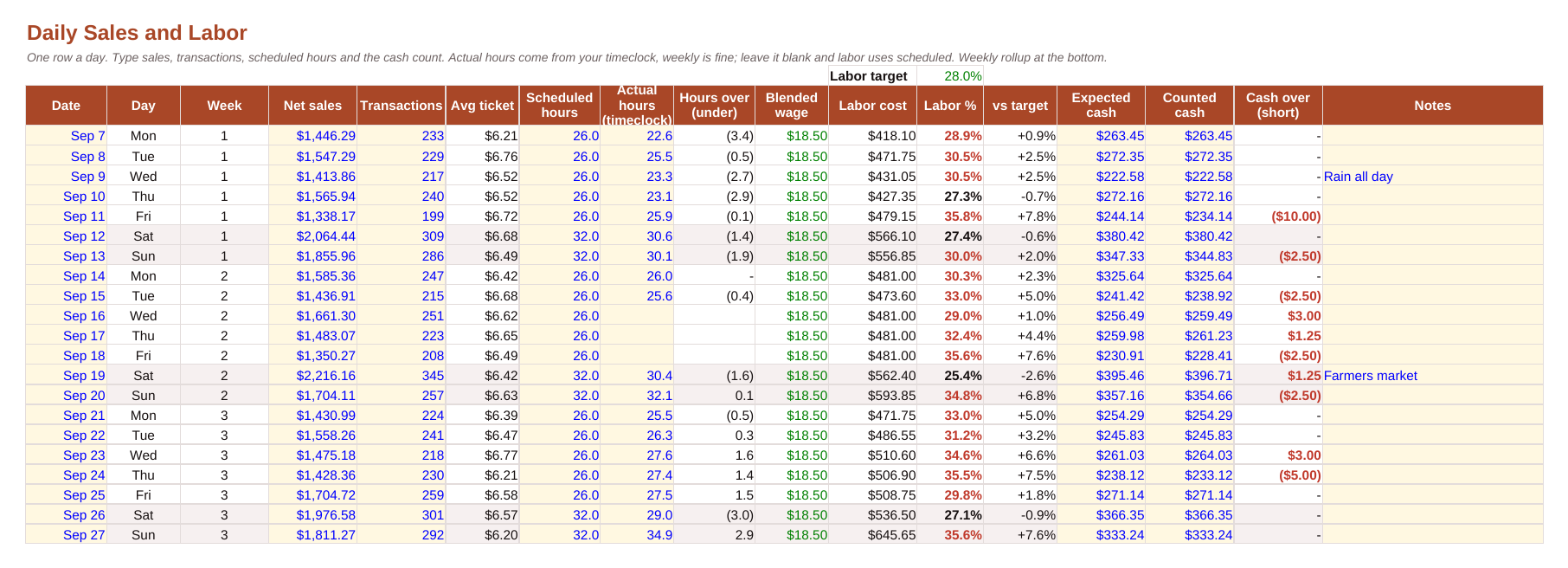
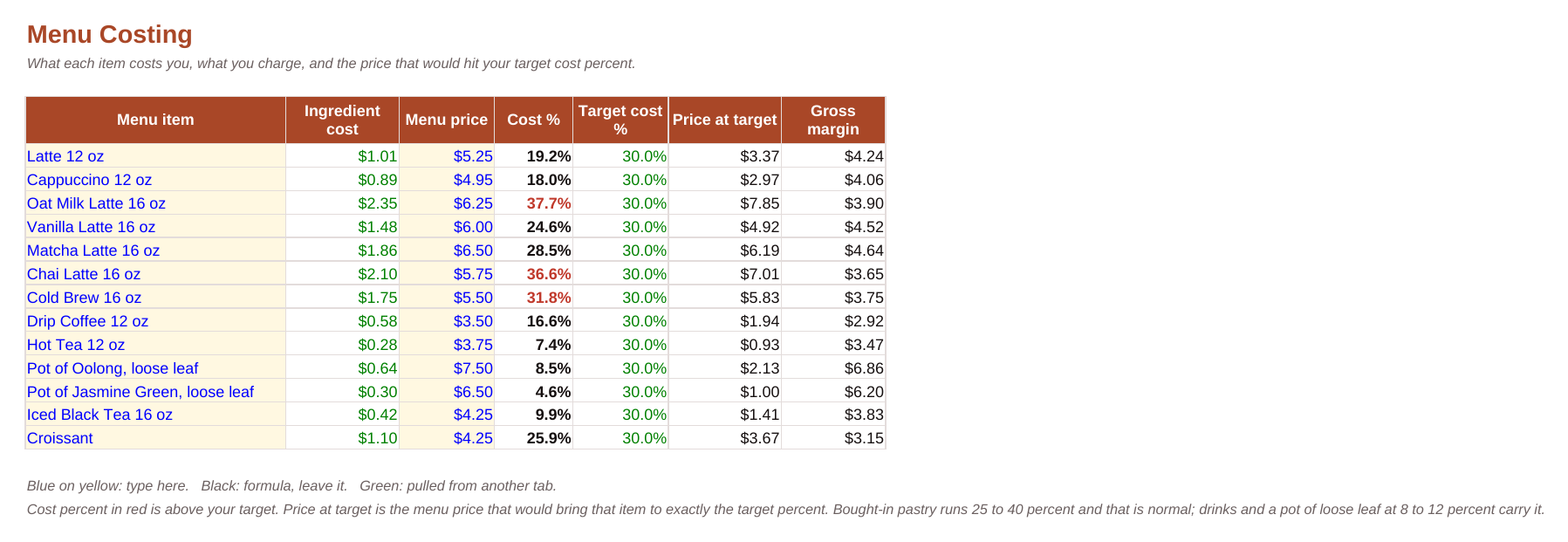
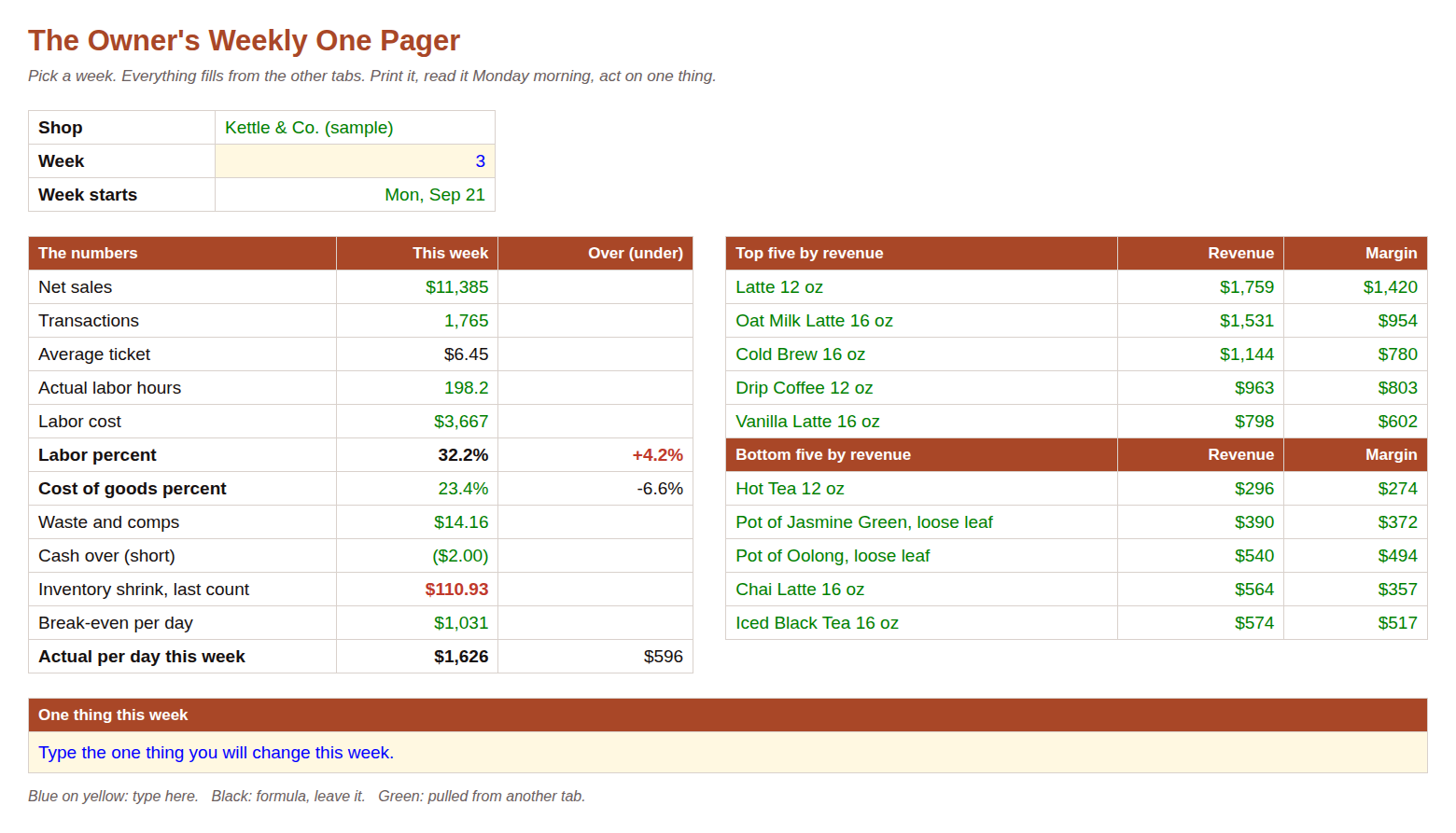
Four of the twelve files, as they look on screen. Tap one to see it full size.
Which of these sounds like your week:
If two or more of those are yours, this kit was written for your shop.
Every night, five minutes
Sales, transactions, scheduled hours and the cash count go in. Average ticket, labor cost, labor percent against your target, and cash over or short come out, in red when something is off.

What one number is worth
In the kit's sample shop, a fictional cafe, week three's labor ran 32.2 percent against a 28 percent target. On $11,385 of sales, that is $479 over in one week. The one pager shows it on Monday morning, in time to fix the next schedule.
In a 2025 survey of independent coffee shop owners, the average margin was 13.8 percent. At that margin, four points of labor is close to a third of the profit.
Source: Coffee Shop Keys, 2025 Independent Coffee Shop Industry Report. Try your own numbers in the free break-even sheet.
The numbers
The daily numbers workbook: twelve tabs, 1,171 formulas, sample data from a fictional shop so you can see it working before you type over it. Excel, and it opens in Google Sheets with File, Import.
Sales, transactions, scheduled hours, actual hours from the timeclock, the cash count. Labor percent turns red when it is over your target. A weekly rollup underneath.
Ingredient costs by the gram, the milliliter and the cup. Recipes look them up. Menu Costing shows what each drink costs you, what you charge, and the price that hits your target.
Count the shelf. The sheet works out what left, what should have left from sales, and the difference in dollars. A waste and comp log with twelve reasons, so a remake and an expired pastry stop looking like the same problem.
Fixed costs in, the sales you need per open day out. Then the weekly one pager: every number from the week on one page, on the tablet or the clipboard, read Monday morning.
The routines
Fourteen pages. The opening list by station, the mid-shift reset, closing with next-day prep and the final walk, and the cash routine: the float, drops, the closing count, and what size of variance is worth a conversation.
Machine on and dialed in, tea station stocked, float counted, initials before the door opens.
The reset after the morning push: restock, wipe down, recount, before the lunch line.
Next-day prep, the closing count, the final walk, initials.
Cleaning and maintenance on a calendar with the temperature log, and what to do when the power goes, the water goes, or the machine dies at 7 AM.
The people
Eleven pages plus a schedule workbook, written for the owner who is also the manager.
Three job posts (barista, shift lead, opener), an interview guide, a paid trial-shift scorecard with a decision rule, a reference check.
Day by day, with trainer and trainee sign-off, and station checklists: shown, practiced, solo.
A two-week schedule builder that shows labor percent by day and who is alone on the floor, before you post it. A wall copy with names and times and no pay.
Late, the short till, the no-show, the conflict, the raise, letting go. The words to say, and the review cadence and pay ladder that make them rarer.

The month
The Monthly workbook takes one column a month from the POS, payroll and the invoice tray and gives you a one-page P&L with the five ratios against targets: prime cost, labor, goods, occupancy, and margin. Red or green. Then a quarterly pricing review and the vendor call scripts, with a six-page guide.
After you buy
The download link arrives by email: one zip, twelve files. If the link ever stops working, support@tillwhistle.com sends a new one.
Open the manual to page 3. Fill in the Settings tab: your labor target, cost of goods target, wage, and the days and hours you are open.
One row on the daily sheet after close, about five minutes.
Read the one pager. Pick one thing to change this week and write it at the bottom.
The files
One zip, twelve files. Every workbook has sample data from a fictional shop and the formulas are open; type over them. 2,382 formulas in all, checked for errors.
Questions
The daily sheet is one row: sales, transactions, scheduled hours and the cash count, about five minutes after close. Everything else fills in by itself. You only type in the blue cells.
You type what the POS and the till already tell you. The sheet does the math and turns a number red when it is over your target. The manual explains each number in plain words.
The POS knows what you sold. It doesn't know your labor target, your schedule, what got thrown away, or what the till should have held. The kit puts those next to your sales, one row a day and one page a week.
Yes. The recipes include a pot of loose leaf and a batch iced tea, costed by the gram, and every sheet works the same way for any shop that mostly sells drinks.
Excel workbooks that open in Google Sheets, PDFs to read or print, and Word files of the checklists and procedures so you can edit them for your shop.
Both. If you are open, start the daily sheet tonight. If you are opening, start with Break Even and Menu Costing, then the hiring pages and the first 14 days.
Because these are files you keep, refunds are for problems: a file that won't open, a formula that breaks, or something this page promises that isn't there. Write to support@tillwhistle.com within 14 days of purchase and say what's wrong. We fix it, and if we can't, the full $97 comes back. Refunds aren't available for a change of mind after the files are downloaded, so try the free break-even sheet first. It is built the same way as the rest of the kit.
Fit
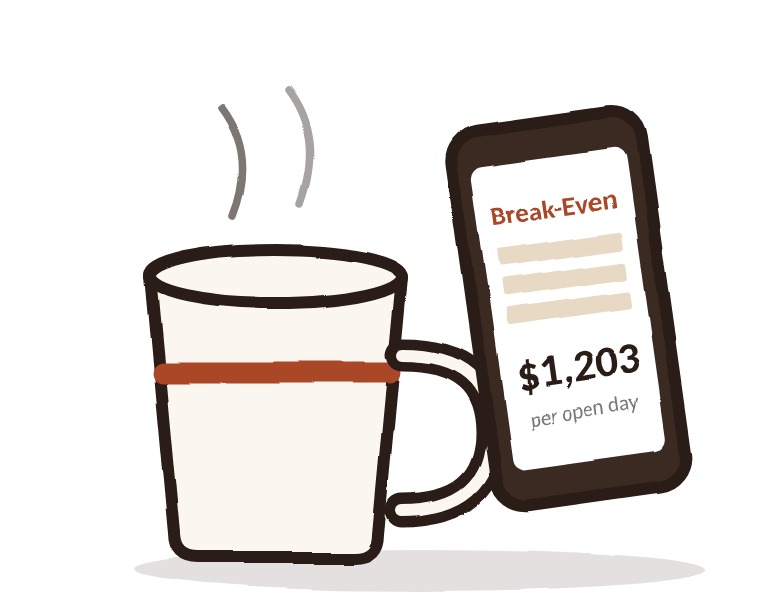
The break-even sheet is free and asks for no email address. Fixed costs in, the sales you need per open day out, and what one change does. If that sheet is useful to you, the kit is more of the same.
The price
Know last week's labor, cost of goods and cash by next Monday. Built for independent coffee shops, tea houses, boba shops and cafes in the United States running one to three locations.
Files you keep, with a 14-day fix-it-or-refund guarantee: if a file doesn't work or isn't what this page describes, write to support@tillwhistle.com and we fix it or refund the full $97.
Nothing recurring and nothing to book. The price is the whole price.